
FACEIT map win rates and veto help
Atlas for FACEIT compares how your team and the other team have played each map in the CS2 pool, and turns it into a clear call during the FACEIT veto: which map to ban and which one to keep — or which map to vote for when the room votes.
Add to Chrome — free Free · no account · Chrome, Edge, Brave, Opera
The veto in a few seconds
The map veto is short and usually rushed. Without data, bans end up being about habit. Atlas puts each team's recent results on every map next to each other, so the decision is based on how both lineups have actually played.
What Atlas shows during the veto
- Win rate per map for both teams, from their recent matches
- A clear call — "Ban X · keep Y", or which map to vote for in a two-map vote
- All of it in the room's centre panel — the confirmed map, the server and both teams side by side, with no extra window to open
- The sample size behind every number, so a 100% from a single match isn't mistaken for a pattern
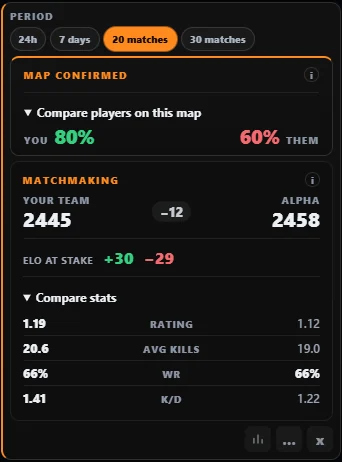
Honest about small samples
A map with two matches isn't evidence. Atlas only marks a read as high confidence when it's backed by enough matches, labels short samples as such, and falls back to a general suggestion when the data isn't there. That's deliberate: a confident recommendation from thin data would be worse than none.
Map by map, side by side
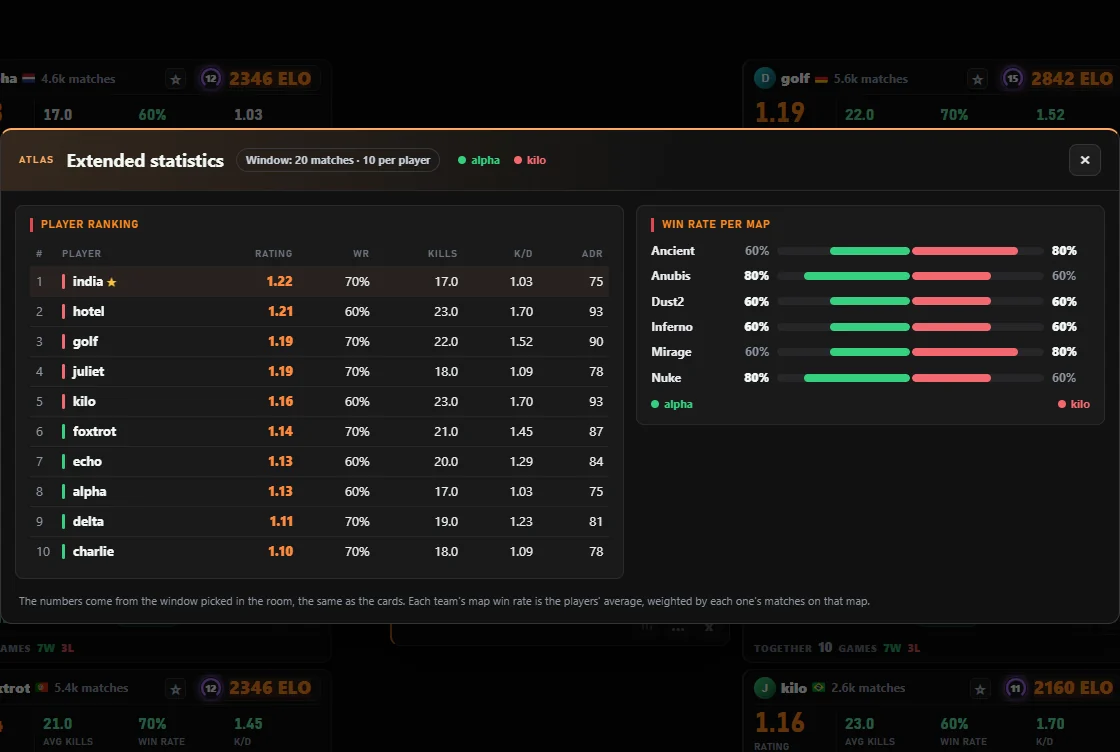
The extended stats view adds a table with each team's win rate on every map of the pool and a map radar, so you can see at a glance where one team is clearly stronger.
How to use it
- Install Atlas for FACEIT from the Chrome Web Store.
- Join a FACEIT CS2 match room before the veto starts.
- Open the match panel: the map comparison and the call update as maps get banned.
Questions
Does Atlas show the FACEIT map winrate of both teams?
Yes. During the veto it shows the map winrate of your team and of the other team for every map in the pool, from the recent matches in the window you choose, with the sample size next to each number.
Can Atlas ban maps automatically?
No. Atlas shows the comparison and a suggested call; you make the ban or vote yourself.
Which maps does it cover?
The maps in the current FACEIT CS2 pool for your match. Practice maps are left out of the comparison.
How many matches is the comparison based on?
It depends on the window you choose (for example the last 20 or 30 matches), and Atlas shows the sample next to each number.